Wednesday, May 29, 2019

Sunday, April 14, 2019
Wednesday, March 13, 2019
mssqlctl and mssql-tools error on ubuntu
When attempting to install the command line tools for SQL Server on Ubuntu 16.04.3, I would get the error: “E: Unable to locate package mssql-tools”

MSSQLCTL ERROR : written on pyton below are the steps to install.
1. Install the necessary Python packages:
sudo apt-get update && / sudo apt-get install -y python3 && / sudo apt-get install -y python3-pip
2. Upgrade pip3:
sudo -H pip3 install --upgrade pip
3. Install mssqlctl with the following command:
pip3 install -r https://private-repo.microsoft.com/python/ctp-2.3/mssqlctl/requirements.txt --user
MSSQL-TOOLS ERROR :
1. Import the public repository GPG keys used by apt to authenticate packages from Microsoft.
2. Add Microsoft to the apt repository.
3. Update the apt-get.
4. Install the mssql-tools now.

MSSQLCTL ERROR : written on pyton below are the steps to install.
1. Install the necessary Python packages:
sudo apt-get update && / sudo apt-get install -y python3 && / sudo apt-get install -y python3-pip
2. Upgrade pip3:
sudo -H pip3 install --upgrade pip
3. Install mssqlctl with the following command:
pip3 install -r https://private-repo.microsoft.com/python/ctp-2.3/mssqlctl/requirements.txt --user
MSSQL-TOOLS ERROR :
1. Import the public repository GPG keys used by apt to authenticate packages from Microsoft.
2. Add Microsoft to the apt repository.
3. Update the apt-get.
4. Install the mssql-tools now.
curl https://packages.microsoft.com/keys/microsoft.asc | sudo apt-key add -
curl https://packages.microsoft.com/config/ubuntu/16.04/prod.list | sudo tee /etc/apt/sources.list.d/msprod.list
sudo apt-get update
sudo apt-get install mssql-tools


Tuesday, March 12, 2019
Tuesday, March 5, 2019
Sunday, February 17, 2019
Monday, December 10, 2018
Friday, December 7, 2018
Wednesday, November 21, 2018
SSRS installation failure on existing cluster node
Rule “Existing clustered or clustered-prepared instance” failed’ error while adding new features to an existing instance of SQL Server Failover Cluster
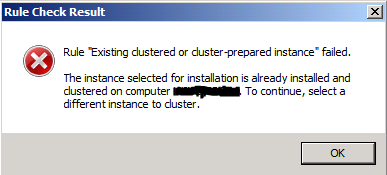
To overcome the cluster installation rule we need to perform a skip rule installation. below command is used to add feature of SSRS to the existing cluster node. This successfully installs reporting services on the node.
Setup.exe /q /IACCEPTSQLSERVERLICENSETERMS /SkipRules=StandaloneInstall_HasClusteredOrPreparedInstanceCheck /ACTION="install" /ERRORREPORTING=1 /UPDATEENABLED="False" /INSTANCENAME="MSSQLSERVER" /FEATURES="RS" /RSINSTALLMODE="DefaultNativeMode" /SQLSYSADMINACCOUNTS="xyz\mo.adil"

Tuesday, October 2, 2018
Friday, September 28, 2018
Wednesday, September 26, 2018
Monday, June 4, 2018
Physical Join Operator in SQL Server
Physical Joins are chosen by the Optimizer. SQL Server is designed well enough to identify the optimal plan for any query executed.
Physical Joins Operators


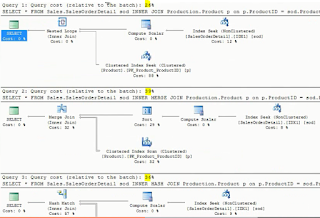


Physical Joins Operators
- Nested Loop Join
Chosen in OLTP systems with small transactions.
When the outer input is small and the inner input has an index on the join key.
No restrictions on operators.
Input need not be sorted.
- Merge Join
Chosen when a medium to large transactions.
Equality operator should be specified in the query.
Input should be sorted.
- Hash Join
Chosen when large data set is required and many types of set operators are involved.
Equality operator should be specified in the query.
Input need not be sorted.
Demo Output
1. Optimizer picking the plan depending on the where clauses :


2. Forcing same where clause with different Join operators.


Subscribe to:
Posts (Atom)